Fun with Streamlit
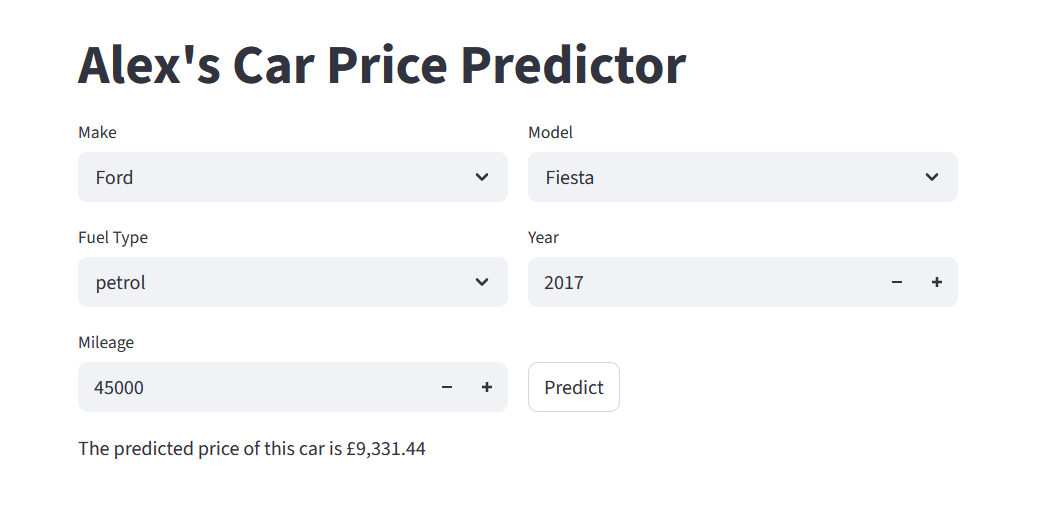
In the last wee while I’ve been working on setting up a proper user interface for my car price predictor, using Streamlit. In this post I’ll chat a bit about Streamlit, classes and objects, and the structure of my code. To just see the app already, click here. Read on to find out what’s happening begin the scenes.
Streamlit
Streamlit is a python library that functions as an app framework. It lets you create input widgets, charts, representations of pandas dataframes, you name it, just by declaring variables. And of course you can do all the usual python stuff in the same file. The workflow is simple. You can start by, as their website puts it, “sprinkling Streamlit commands into a python script”. Then you can run the page locally with streamlit run script.py. Every time something changes (either the file is updated and saved, or a user interacts with some functionality on the page), the whole script is rerun. To deal with slower processes, you can cache functionality to stop it rerunning all the time. This all means its very easy to build your app and watch the changes as you go along. When it comes to deploying it publically, an easy option is via Streamlit Community Cloud. You just point it at a github repo and it will build it for you.
To see how straightforward the streamlit script is, check out the app code on my github repo.
Dropdowns
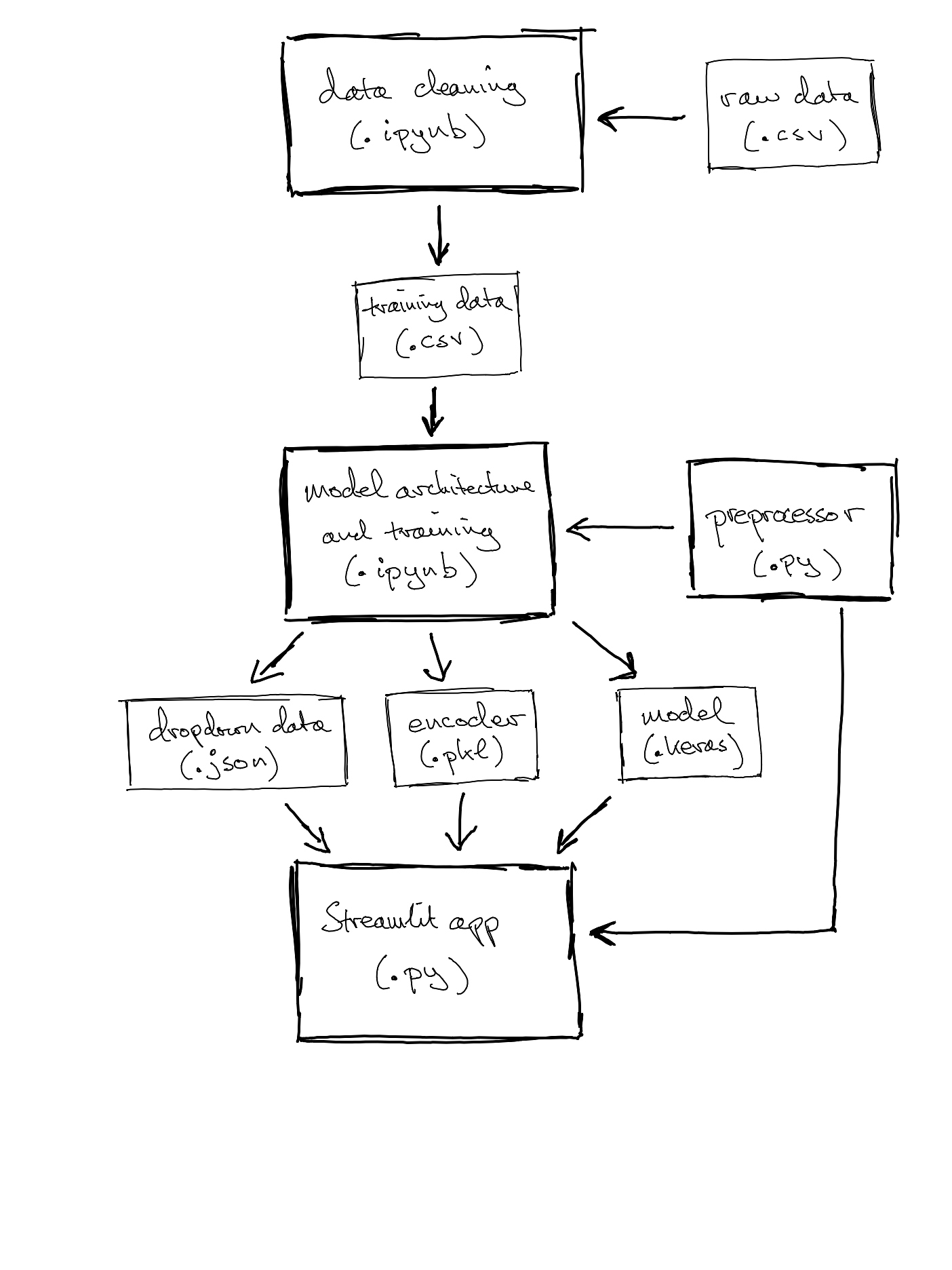
To ensure that the data we input to the model can actually be understood, we need some data validation within the app. The streamlit widget st.number_input lets us restrict the year and mileage inputs to integers in a given range, so we can avoid, for example, negative mileage or time-travelling 300-year-old cars. For the categorical inputs, we use st.selectbox to specify options for a dropdown menu. This ensures we are predicting prices for makes, models and fuel types that we actually have data on*. So we need to get the lists of options from the original data. We want to build in the option to update the underlying model and data, so rather than hard-code the options into the streamlit app, we generate a JSON file when we create/update the model.
Straightforwardly, this could be in the form of a dictionary whose keys are the features (make, model and fuel type just now**) and whose values are lists of allowable inputs. However, the model is not independent of the make. It doesn’t make sense to predict the price of a “BMW Fiesta”, for example. So to avoid an unneccesarily enormous list of models, we restrict the dropdown options to those associated with the chosen make. To achieve this, our saved dictionary has a key make_model whose value is itself a dictionary, recording the mapping from make to list of models. Producing this JSON is not the fastest thing in the world, but it only happens when we update the underlying model. Loading and reading it is very quick for the app.
*There are other approaches to unknown values, but that’s for another post.
**The astute among you will notice that the current version no longer has variant as an input (GT, S, Active, etc.). The variant data is very messy and I’m not convinced it makes a material difference. But perhaps its something for future refinements.
The encoder: classes and objects
Both the app and the code that trains the neural network need to be able to encode categorical features as integers, for training and forward propagation, respectively (see my post on embeddings). As with the dropdown data above, these encodings might change with updated training data and it is obviously crucial that the model and the app use the same encodings. So we want to create the encoder once and save it somewhere that both files can use it. This is an opportunity to explore some object-oriented programming ideas.
A class is like a template. An object is an instance of a class, following that general template. Sticking with cars, we could take “Ford Fiesta” as a class, with individual cars (perhaps identified by registration number) as objects in that class. A class might have methods, perhaps .get_colour() returns the colour of the car, which would be an instance variable, a variable that takes different values for different objects in that class.
For the set-up at hand, the encoder will be an object, an instance of a class TextEncoder. This class is defined in a small script (the preprocessor) that both the model and the app will import, which tells them how to use the encoder. The class has a couple of methods: .fit(), which takes a dataframe of training data and uses it to create vocabularies for nominated categorical features, and .transform_df(), which converts the string values of categorical features to integers (in the right dictionary structure to input to model.predict()). The created vocabularies are stored as attributes of the encoder object.
Each time the neural network is trained, the notebook will use the class TextEncoder that it has loaded to create an encoder object, endow it with vocabularies, fit it to the training data, and save it conveniently as a pickle file, an adorably named way to save python objects as binaries for use later by other scripts. Then, when a user asks for a prediction, the app (which “unpickles” the encoder when it loads up) can encode the input in the right format and feed it into the neural network to get a predicted price.
Structure
We’re starting to see a proliferation of different saved files. Continuing in this vein, the data cleaning is now conducted in a separate notebook, which saves the cleaned data as a CSV, to be read when building the vocabularies (using the encoder described above) and training the neural network. The final thing to mention is that the model setup notebook saves the trained model as a .keras file, which allows the streamlit app to access it to do the inference, the whole point of the exercise.
Conclusion and next steps
So, what’s the big picture? I’ve built a python framework that provides a web interface to access predictions from my neural network. Everything is modular and its easy to plug in new data or modify the model architecture without rewriting all the code, and without having to carefully duplicate things. Based on this experience, Streamlit seems like a great way to get data-based (snigger) apps up and running quickly and painlessly. And it has plenty more functionality to explore. I’ve also learned about some fundamental ideas in object-oriented programming.
When the app predicts that a car will cost £15,601.56, I suspect the first phrase that pops into your mind is “spurious precision”. So I need to think about what a more practical output might be. Perhaps the user enters the advertised price of the car, and the app tells them if it is close or far away from what it considers the market price. So there is some thinking to be done around the actual use-case. The app is also quite bare-bones at the moment. That is to say, it isn’t very beautiful!
But for next time, I think it’ll be back to the data. How can I get better training data? How can I improve the model’s accuracy?
Thanks for reading! Do feel free to connect on LinkedIn if you have comments, or if there are any embarrasing mistakes, or if you’d just like a new friend.